

check

check

check

check
check
check
check
check

check

check
The Line Stopped—Which Section Do You Check First?
Directing Audible & Visual Alarms to the Exact Fault Station
A packaging line suddenly halts. At the discharge end, the operator hears an alarm but cannot see the upstream transfer point. Is it an upstream product jam, or did a power circuit trip? If both anomalies merely illuminate the same indicator light on the main control cabinet, maintenance technicians arriving on-site still have to walk the entire line to locate the issue.

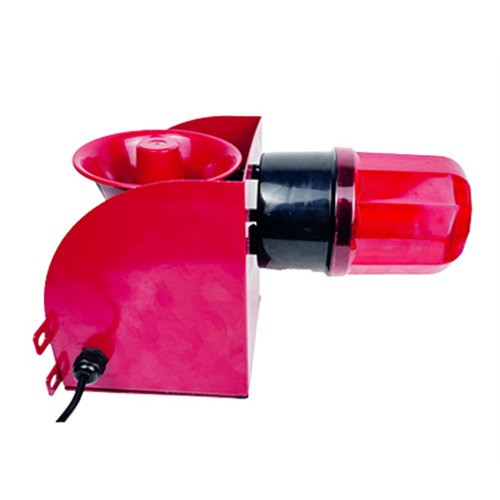
At jam-prone transfer junctions, the jam alarm output from your existing controller can be wired directly into a KJT-LV001T Discrete Input Audible & Visual Alarm. Jam detection continues to be handled by your existing sensing system; once triggered, the unit at that specific station emits an audible tone and high-visibility LED strobe—giving even operators stationed at adjacent cells an immediate starting point for troubleshooting.
Installation Tip: Before mounting, check lines of sight from both operator stations and inspection aisles to ensure stacked tote boxes will not obstruct the beacon.
If an alarm shares the same power circuit as the production equipment without backup power, a standard alarm will go silent the moment power drops. Critical power circuits can be equipped with a dedicated KJT-LD115A Power-Loss Audible & Visual Alarm. According to official product specifications, this model continues alarming for approximately 3 to 4 hours following a power outage.
Installed adjacent to the corresponding electrical distribution cabinet, it gives maintenance technicians an unmistakable diagnostic distinction: if a workstation beacon lights up, inspect the process first; if the electrical cabinet alarm sounds, verify power supply first.
When multiple workshops require centralized supervision, networked locations can be outfitted with the KJT-W03C Wireless Network-Controlled Alarm, connecting via 4G to a companion platform for centralized status monitoring and remote alarm control.
We recommend naming alert points with explicit location tags—such as "Packaging Line 1 – Transfer Junction" or "Packaging Line 1 – Power Cabinet"—so control room dispatchers and shop-floor technicians are always referring to the exact same spot.
Before putting the system into service, test both product-jam and power-loss scenarios using simulated trigger signals. During final acceptance, don't just ask, "Did the alarm sound?"—have on-duty operators stand at their normal workstations and answer: "Where is the alarm coming from, and should we check the machinery or the power supply first?"
If you are looking to add audible and visual alerting to an existing production line, share your line layout, available alarm outputs, and target personnel roles with KJT—we will help define the right models and mounting locations for your facility.